Testing Small LLMs For Medical Result Interpretation
How small local models perform on the task of extracting and interpreting blood test results on mobile devices
Edited on 23.5.2026 to add more details.
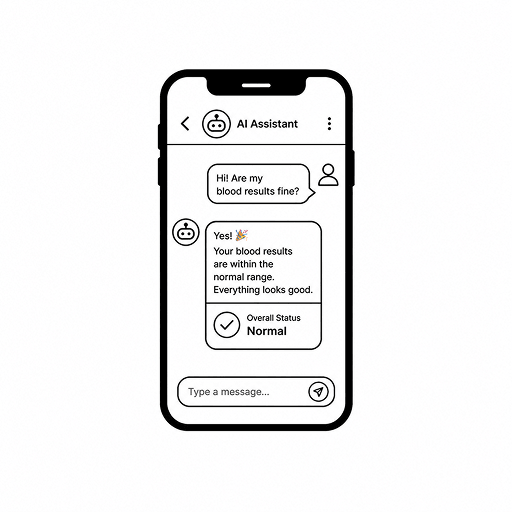
A lot of AI demos look impressive until you give them a real blood test.
That was the starting point of this project.
At first, the idea looked simple. Take blood test results, let a small LLM explain them, and make it work on a phone.
The moment I started looking at it as a real product, the problem changed.
In medicine, it is not enough for the answer to sound reasonable. It has to be grounded, private, and stable enough that one wrong value does not silently change the meaning of the whole result.
That is why I went with local models.
If this kind of thing should be usable in practice, it has to work offline or on premise, keep sensitive data safe, and stay fast enough even on normal phones. That turns the project into two separate questions:
- Which small models are reliable enough for extraction and interpretation of lab results?
- Which mobile runtimes are realistic enough to ship without destroying speed, memory, or battery life?
What I Tested
To answer that properly, I generated a dataset of 118 synthetic blood-test samples and evaluated 20 small language models.
To get real structured medical data is next to impossible, so I used a synthetic dataset. The samples were generated with Gemini 2.5 Pro (it was quite a while ago, but that was the best option at the time) and then manually checked for quality and realism. The dataset is not perfect, second best option after scavenging real data.
When look at such blood results, we firstly look at values, then we compare it with the reference range, and then we read through it as whole. So the benchmark was designed to test those three levels of understanding separately.
We can split it as follows:
Task Levels
- Level 1: extract one value
- Level 2: interpret one value
- Level 3: extract multiple values
Then I ran the models through three different pipelines:
Evaluation Pipelines
- Few-shot prompting with LangExtract
- Schema/tool calling with PydanticAI
- Heuristic prompting with parsing fallback - no guided decoding or structured output, just a prompt and a parser that tries to make sense of the result
Those were not just benchmark labels.
They were the two main ways I tried to make small local models behave like something more reliable than free-form chat.
LangExtract
LangExtract was the few-shot path.
For each task type and difficulty, I prepared examples and passed the report together with the extraction prompt through lx.extract.
The model is given multiple examples (sample resulsts) and then it is asked to extract the value, unit, and range classification for the target analyte. The output is still text, but the examples guide the model toward a more consistent format.
It is really useful, if you try to find similar structures in large amount of text. It is not as good when the task requires more interpretation, or when the model has to deal with more complex cases that do not fit the examples well.
PydanticAI
PydanticAI was the schema and tool-calling path.
Here, every task had an explicit output model: value, unit, range classification, reasoning payload, or a list of analytes. The model still talked to the same local OpenAI-compatible endpoint, but instead of returning loose text, it had to produce a typed object that matched the expected shape before it could be evaluated.
Heuristic - prompting with parsing fallback
The heuristic pipeline was the most free-form one. I have given the model a prompt that explained the task and asked for structured output.
Afterwards, I was trying to parse the output with a custom parser that looked for numbers, units, and keywords. There was no strict contract here. If the model returned something that looked like a value, I tried to make it fit into the expected format as best as I could.
Parameters measured
The evaluation was not just about accuracy.
I measured exact match and partial match.
Exact match means the model got the value, unit, and range classification right. Partial match means it got at least the value right, even if the unit or range was wrong.
The reasoning is that I do not want to penalize models for partial failure and I want to see how often they can at least get the value right, even if they mess up the unit or the range.
At charts, you can see accuracy and score labels. Accuracy is the exact match, while score is the partial match.
The First Clear Result
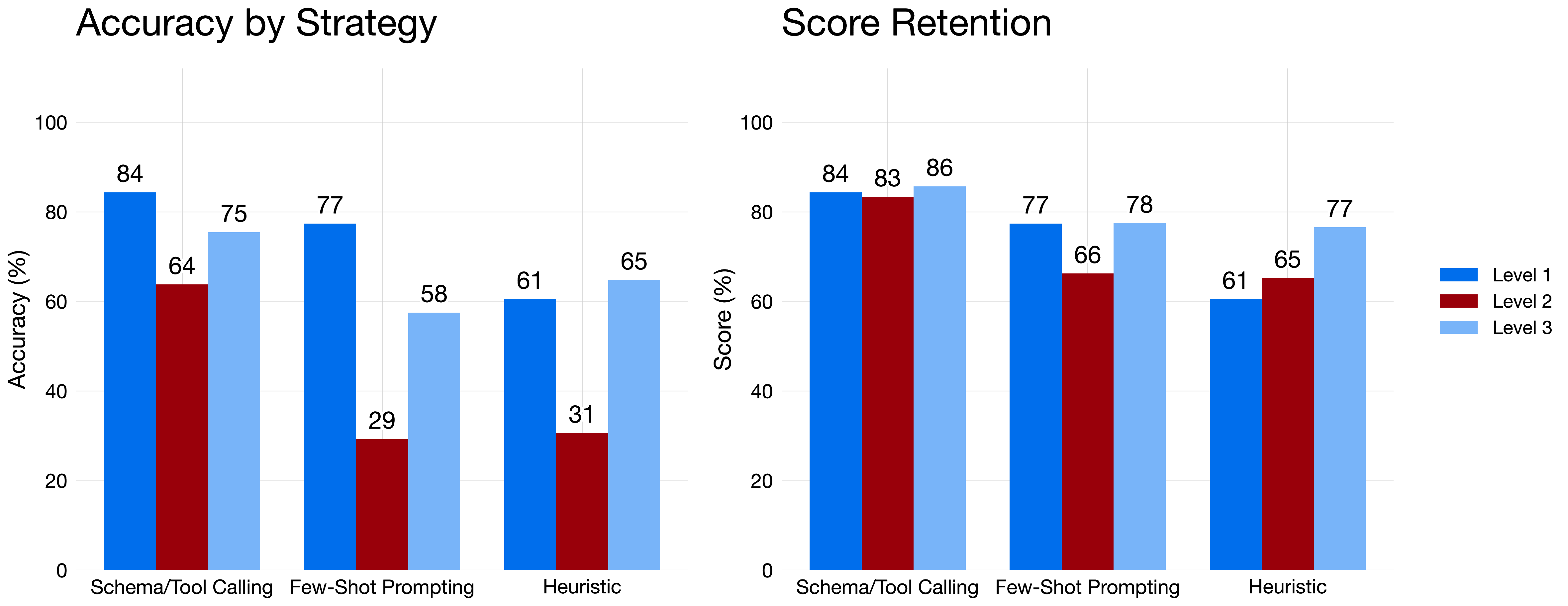
Chart: Exact match and partial match by task level across the three extraction strategies.
The strategy comparison was probably the cleanest result in the whole benchmark.
Schema and tool calling won on every task level. It reached 84.39% exact match on Level 1, 63.82% on Level 2, and 75.49% on Level 3. More importantly, its partial match stayed above 83% on every level.
That is the part I care about more.
It means the pipeline was not just accurate when things lined up nicely. It stayed more stable even when the task became more interpretive.
Few-shot prompting and the heuristic pipeline both dropped hard on Level 2. That makes sense. Level 2 is where the task stops being simple copying and starts being about context.
If I had to compress the desktop benchmark into one takeaway, it would be this:
Structured output wins.
A prompt alone is not enough.
That also clarified what happened with the two main guided pipelines.
LangExtract was useful for testing how far careful prompting can go, but its weakness showed up quickly. It can look up for the value and copy it, but it does not understand that well the interpretation part. It has multiple examples to look at, but it does not have a strict contract that forces it to produce the right interpretation.
That worked well enough for simple extraction. It became more fragile once the task moved from copying a value to understanding what the value means.
PydanticAI benefited from a stricter contract. It did not make the model smarter. It reduced the room for sloppy answers.
Suddenly, the model had to produce a value, a unit, and a range classification. The only source of truth is the document and nothing more, so the model had high chance at succeeding.
And that matters a lot in medicine. If the downstream code expects a value, a unit, and a range decision, forcing the model through a typed schema is much closer to a real product than trusting a paragraph that only sounds convincing.
The Best Models Were Not The Same Everywhere

Chart: The models most relevant to the talk track, including a small baseline for reference.
The model comparison was less clean than the strategy comparison, which is exactly what makes it interesting.
GPT-OSS 20B was excellent in the schema and tool-calling setup, reaching 95% partial match there. But it was much less stable in few-shot prompting and in the heuristic pipeline.
Gemma 4 4B and Qwen 3.5 4B looked more balanced. Both stayed close to 94% on schema and tool calling while still holding roughly 84% to 87% in few-shot prompting and around 80% in the heuristic pipeline.
That is why those two stood out to me as the practical picks.
They were not only good in one ideal setup. They kept behaving reasonably when the setup changed.
The Qwen 3 0.6B baseline was also worth keeping in the chart. It shows how far a very small model can go today. It reached 80.34% exact match in the schema and tool-calling setup, which is not bad at all for a model that does not have even 1GB.
For reference, GPT-5 mini as a cloud-based model reached 95.1% exact match in the same evaluation.
I think that number is useful mostly as a ceiling marker. It shows that the best local setups were already getting surprisingly close or even breaking even.
Full Ranking Matters Too
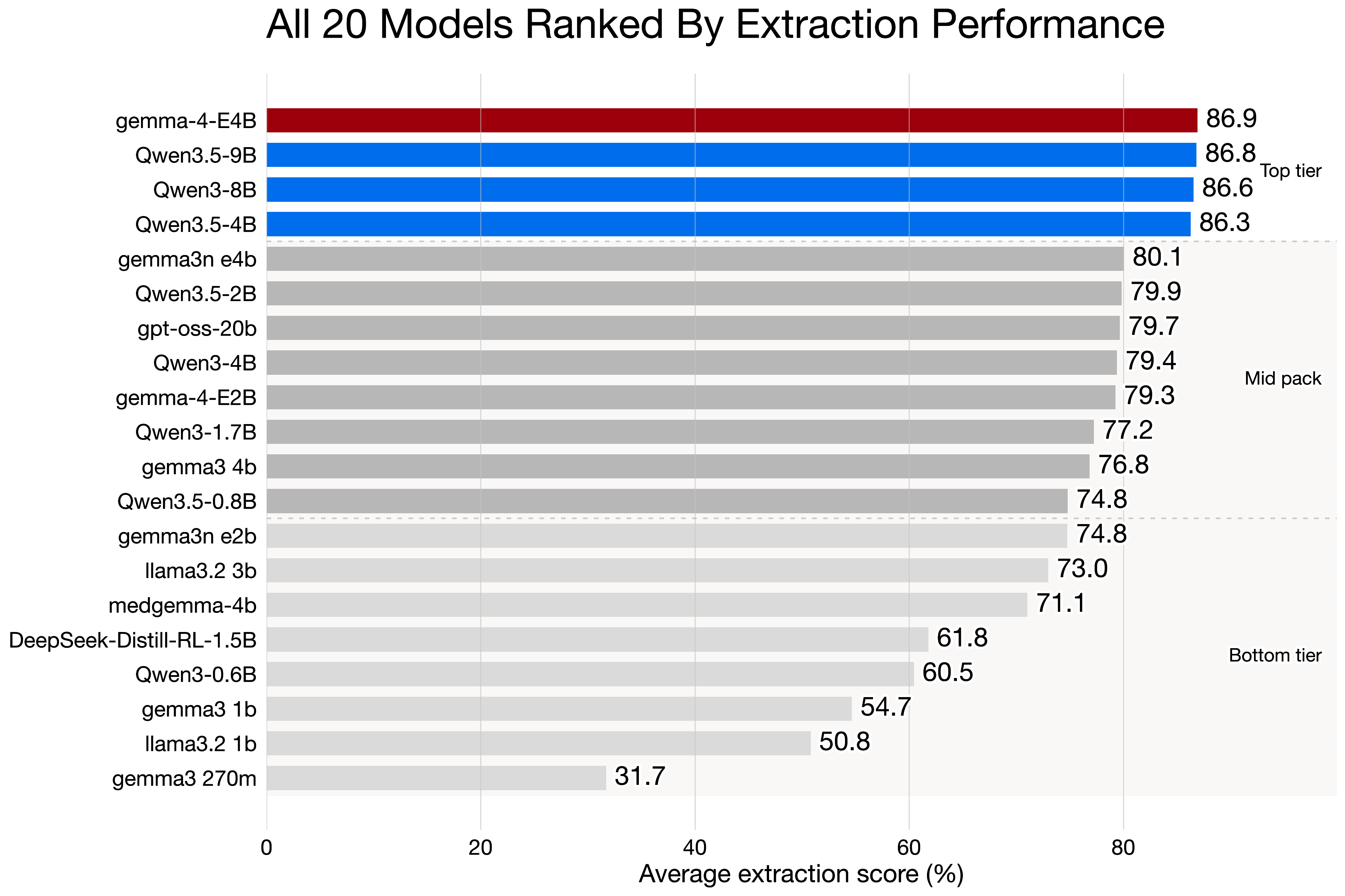
Chart: Ranking across the full tested model set, added here to keep the full benchmark visible instead of only the highlighted models.
I wanted to keep the full ranking in the article because otherwise it is too easy to cherry-pick nice examples.
Across all strategies, Qwen 3.5 9B finished first in the combined ranking with 79.69% average exact match and 86.84% average partial match. Gemma 4 4B was basically next to it with 78.77% average exact match and 86.93% average partial match. After that came Qwen 3 8B and Qwen 3.5 4B.
The main point is not that one model dominated everything.
The main point is that a relatively small top group separated from the rest of the field, and that group was led mostly by Qwen 3.5 and Gemma 4 series.
If I had to simplify the desktop conclusion even further, I would say this:
Gemma 4 looked like the best all-rounder.
Qwen 3.5 looked like the most interesting family if the end goal is to ship something practical on mobile.
The reason, why I avoid talking about the larger models as Qwen 3.5 9B and others is that they are too large for most of the phones still. Most of the phones have at most 4-6GB of RAM and those would just not fit on most of the devices.
Where The Real Risk Is
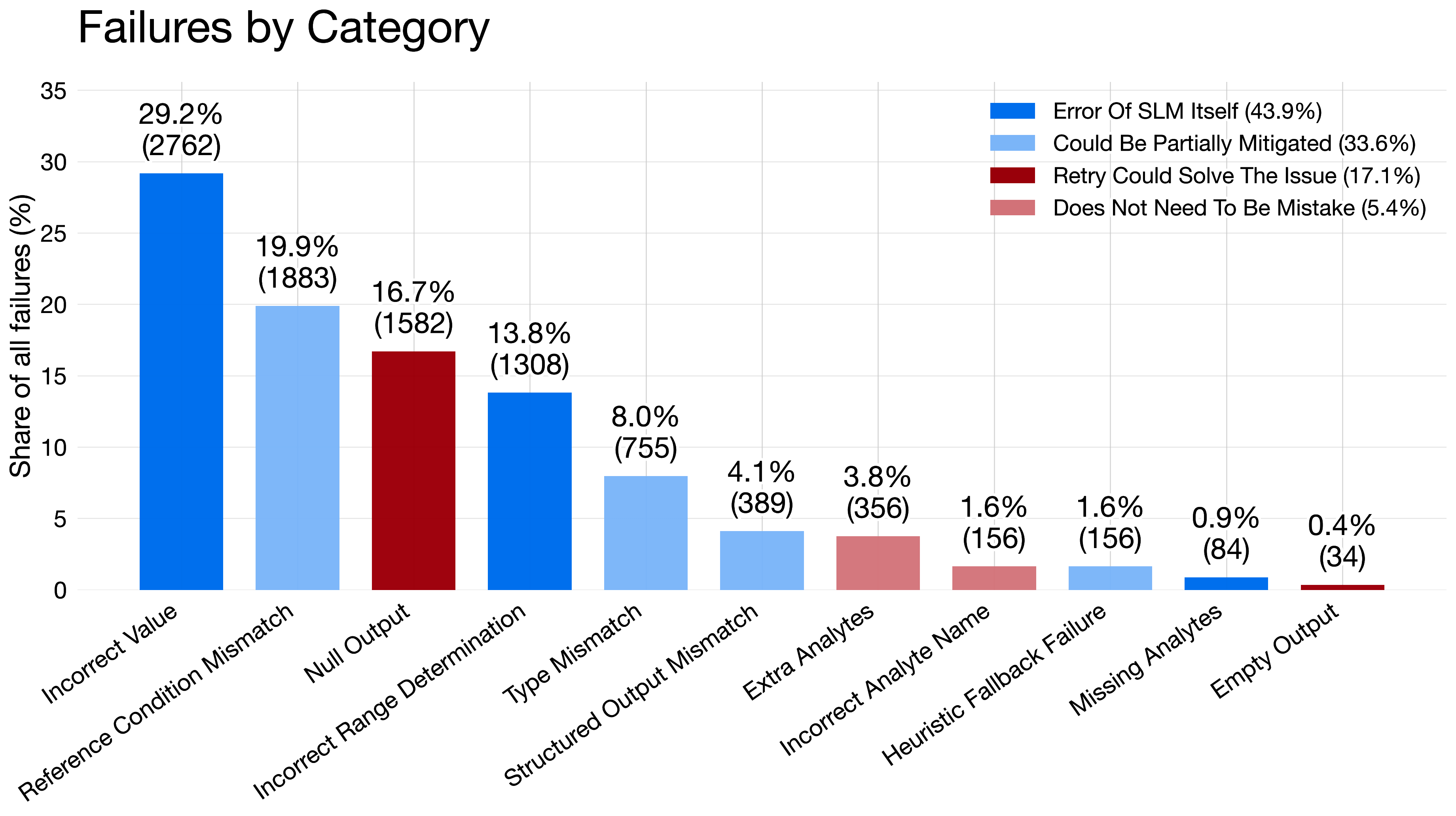
Chart: Share of failure types across the evaluated extraction runs.
The failure chart matters more than the leaderboard.
The biggest single failure type was incorrect value at 29.18% of all recorded failures. After that came reference-condition mismatch at 19.89%, null output at 16.71%, and incorrect range determination at 13.82%.
That is the uncomfortable part of this whole topic.
Missing output is annoying, but visible.
A confident answer with the wrong number is much worse.
When I grouped the failures into broader buckets, 43.89% were direct model mistakes, 33.63% looked partially mitigable by better prompting, parsing, or validation, and 17.07% looked retryable.
That is also why I would not ship this as a free-form medical chatbot.
The safer direction is a constrained assistant that explains already parsed results, exposes uncertainty, and leaves the final interpretation to a clinician.
What Changed On Mobile
The mobile part changed the framing again.
On paper, model choice looks like the main decision.
On a phone, the setup around the model matters almost as much.
Devices Under Test
For the mobile benchmark, I tested the same local-LLM idea on two actual devices: a Pixel 7a on Android and an iPhone 15 on iOS.
The goal was not to build a toy inference demo. I wanted to see what a real medical-results assistant would feel like once the model had to live inside a mobile app with real latency, memory, and battery limits.
There is one obvious caveat here.
The iPhone 15 is simply a stronger device.
So I would not read the cross-platform results as some universal iOS-versus-Android verdict, or as proof that one runtime stack is better just because it runs on one operating system. It is better to read them as a realistic comparison between two actual phones a developer might target, where one of them starts with a higher performance ceiling.
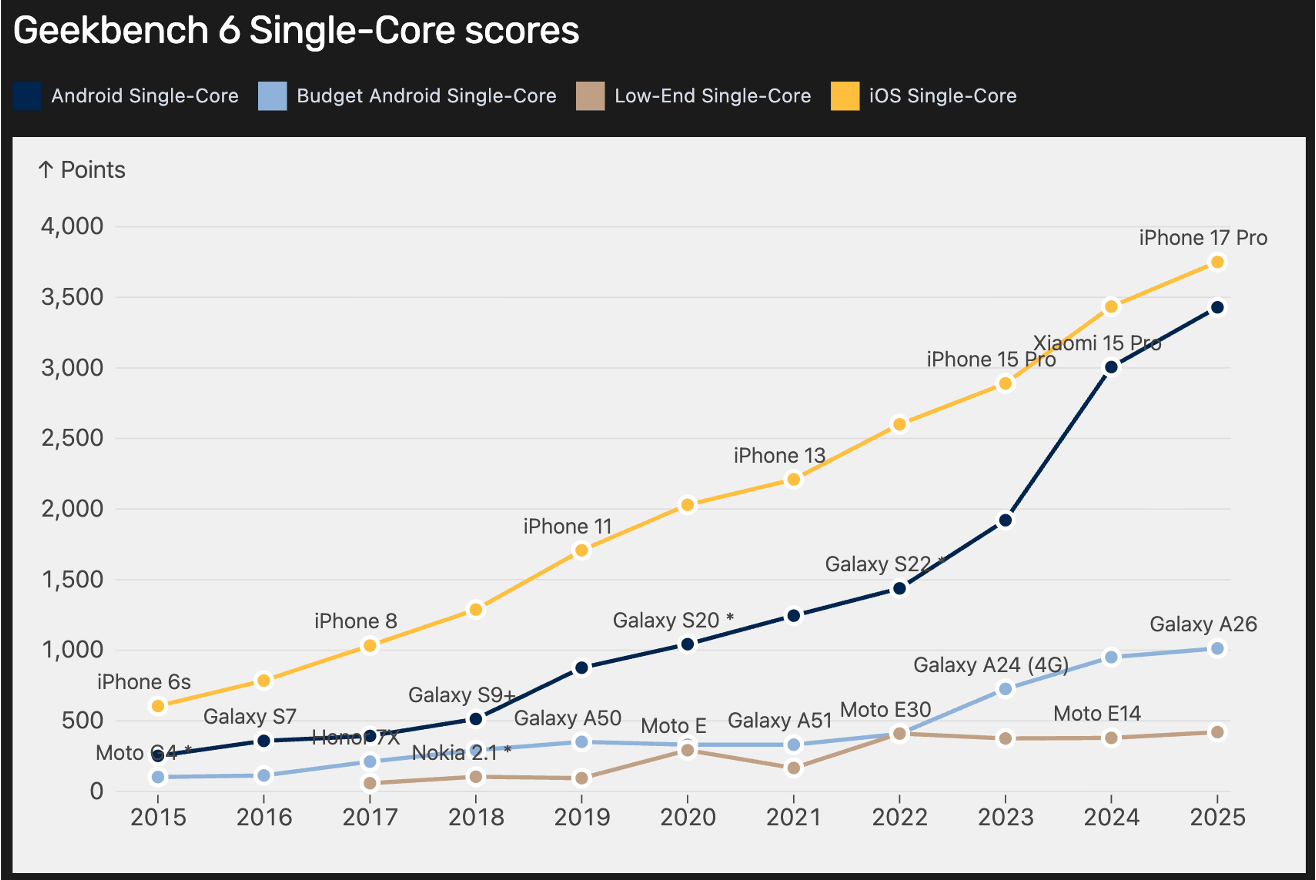
Chart: Geekbench 6 single-core trend showing how iPhones have generally kept a higher performance ceiling than comparable Android phones.
That broader hardware trend matters as context.
Not because single-core CPU decides mobile LLM performance on its own. It clearly does not. Inference also depends on memory bandwidth, accelerators, thermals, and runtime quality.
But it helps explain why the iPhone results started with an advantage. When the base device is stronger, the same model can feel much faster even before runtime differences enter the picture.
Low and middle class Android phones are still improving, but the gap is wide enough that it is a real question whether some of these models will feel good enough on those devices, especially when the runtime is not fully optimized.
App Architecture
The app itself was built as a Flutter shell with native adapters underneath.
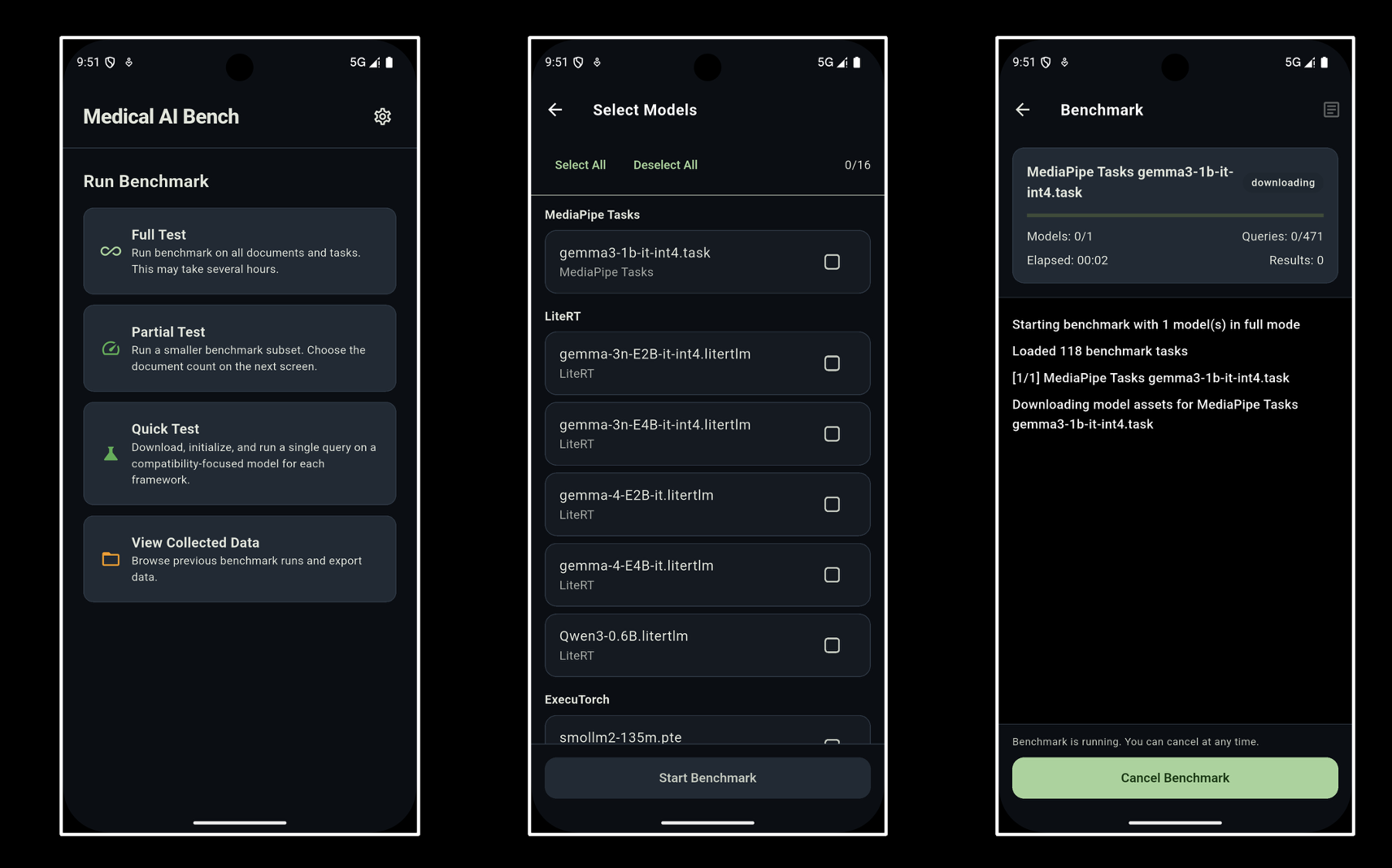
That let me keep the UI and product flow shared while still plugging in the runtime that made sense for each platform. On Android, that meant Cactus, LiteRT, MediaPipe Tasks, and ExecuTorch. On iOS, that meant Cactus, MediaPipe Tasks, and ExecuTorch.
That split matters because it changes the main question.
On desktop, I mostly cared about which model extracts and interprets lab data best.
On mobile, the more useful question is this:
Which device, runtime, and model combination is fast enough, efficient enough, and stable enough to be worth shipping?
The Mobile Frameworks I Used
Cactus
Cactus was the most consistently practical baseline in this benchmark.
It ran on both Android and iOS, stayed CPU-first, and delivered the strongest raw throughput in several smaller-model runs. That made it a very useful low-friction runtime when I wanted to see what a compact model could actually feel like in an app.
LiteRT
LiteRT was the Android path for the Gemma-based GPU runs.
It matters because it represents the more acceleration-heavy route. It scaled better for some larger models, but it also came with noticeably higher RAM pressure and battery cost once the models got bigger.
At time of building, there was no iOS version of LiteRT, so no comparison with iOS was possible. Now, it is available.
ExecuTorch
ExecuTorch was the PyTorch-style deployment path.
It was especially interesting on iOS, where it produced the best provider-average size-adjusted speed, but in this dataset it also showed one of the heavier CPU and energy profiles on Android.
MediaPipe Tasks
MediaPipe Tasks was the other packaged runtime in the comparison.
It is useful as a product-oriented reference point, but in this benchmark it was usually not the performance leader.
Mobile Token Speed
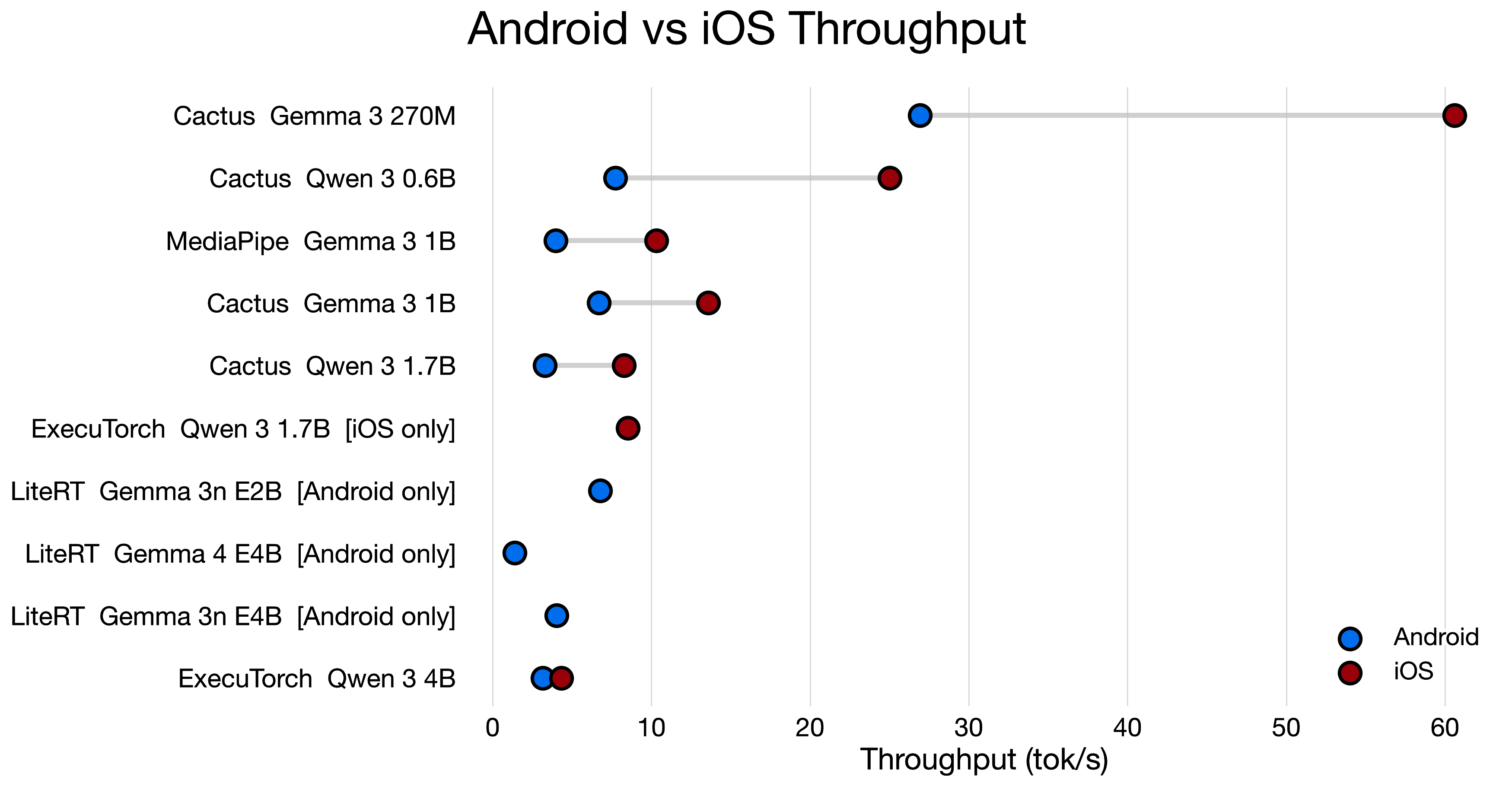
Chart: Dumbbell comparison of token speed for matched Android and iOS runs.
This chart tells the hardware story better than a plain ranking.
In the matched comparisons, iPhone 15 was faster in all 6 out of 6 pairs, with throughput uplifts ranging from 1.37x to 3.23x.
That means the same model and roughly the same runtime idea can feel very different depending on which device it lands on.
The most striking example was still the small-model Cactus path. Gemma 3 270M reached 60.61 tok/s on iPhone 15 versus 26.93 tok/s on Pixel 7a.
Part of that gap is runtime quality.
Part of it is simply hardware class.
That is why I see this chart primarily as an end-user device comparison, not as a clean benchmark of operating systems in isolation.
The broader conclusion is not just that iOS was faster in this dataset.
It is that direct Android-versus-iOS comparisons are more useful than provider averages when you want to predict real user experience for one concrete model, while still remembering that the Apple device here started from a stronger baseline.
The speed of 5-20 tok/s on average is acceptable, if we look at it that user can read the explanation while the model is generating it. The 20-40 tok/s range is good, and anything above 40 tok/s starts to feel really smooth for this kind of task.
Anything below 5 tok/s starts to feel sluggish, especially if the user is waiting for a response after tapping a button.
Another point is that user still has to initialize the model and load it into memory, which can take several seconds on mobile. So the token speed is just one part of the overall latency story.
Mobile Battery Consumption
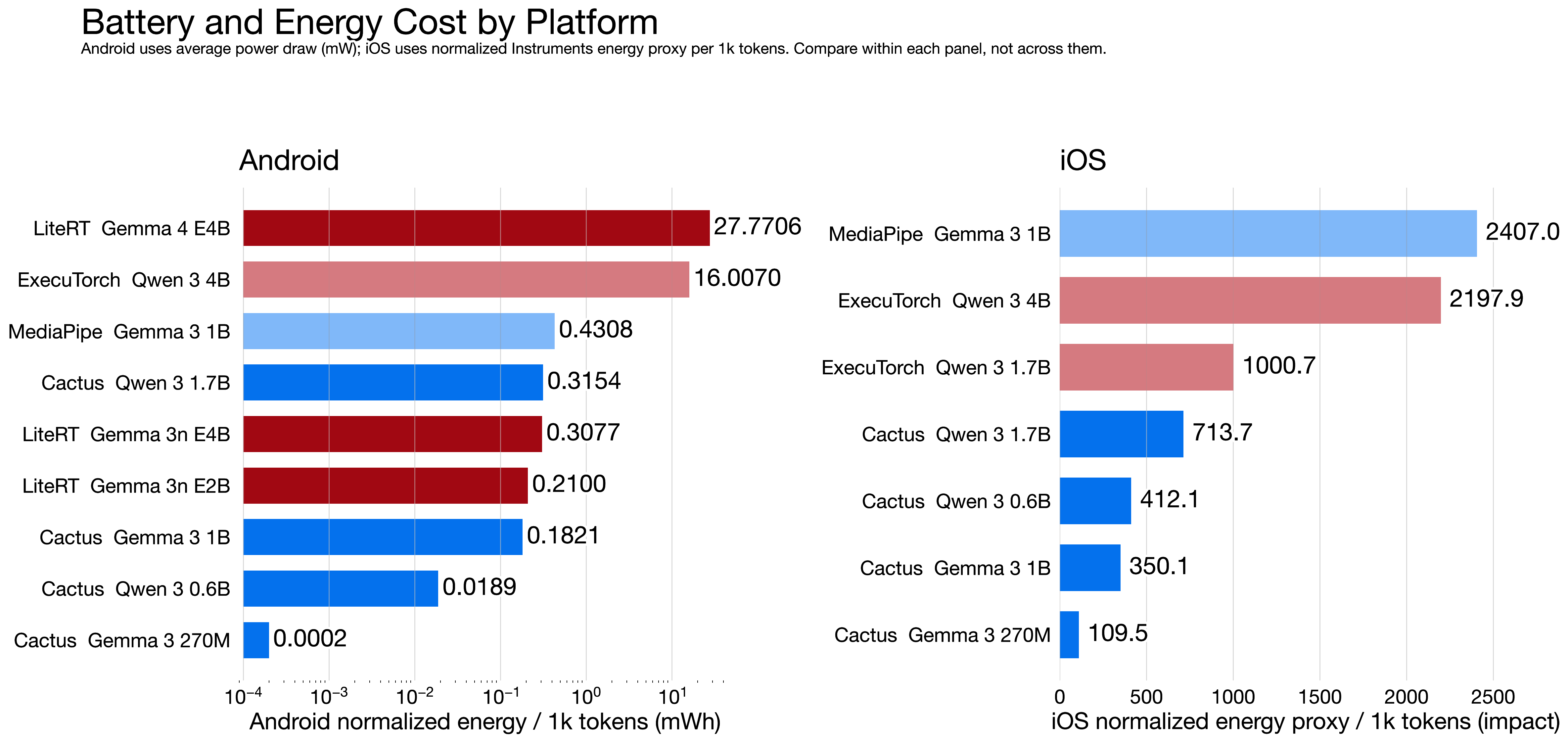
Chart: Android battery cost alongside iOS power proxy index for the measured mobile runs.
This chart needs one important caveat.
Android and iOS are not using the same energy unit. Android uses measured mWh, while iOS uses an Instruments-derived power proxy index.
So the comparison is useful for patterns and for ranking runs within each platform. It is not useful for claiming literal Android-versus-iPhone battery equivalence.
We could go deeper into the numbers, but the main point is that the battery drain is dependent on size of the model and model.
The larger the model is, the more energy it consumes because of the inference and length of the response.
If you use pure CPU, the energy consumption is generally lower, since CPU is much less power-hungry than GPU.
The consumption in average is 0.1-1% per prompt based on how long the response is and how heavy the model is. That is not negligible, but it is also not a dealbreaker for a useful assistant that runs a few times a day.
However, overheating kicks in after repeated runs of the heavier models. Most of the time the status of the phone raised after 15 min of active inference with the heavier models.
CPU And RAM Matter Too
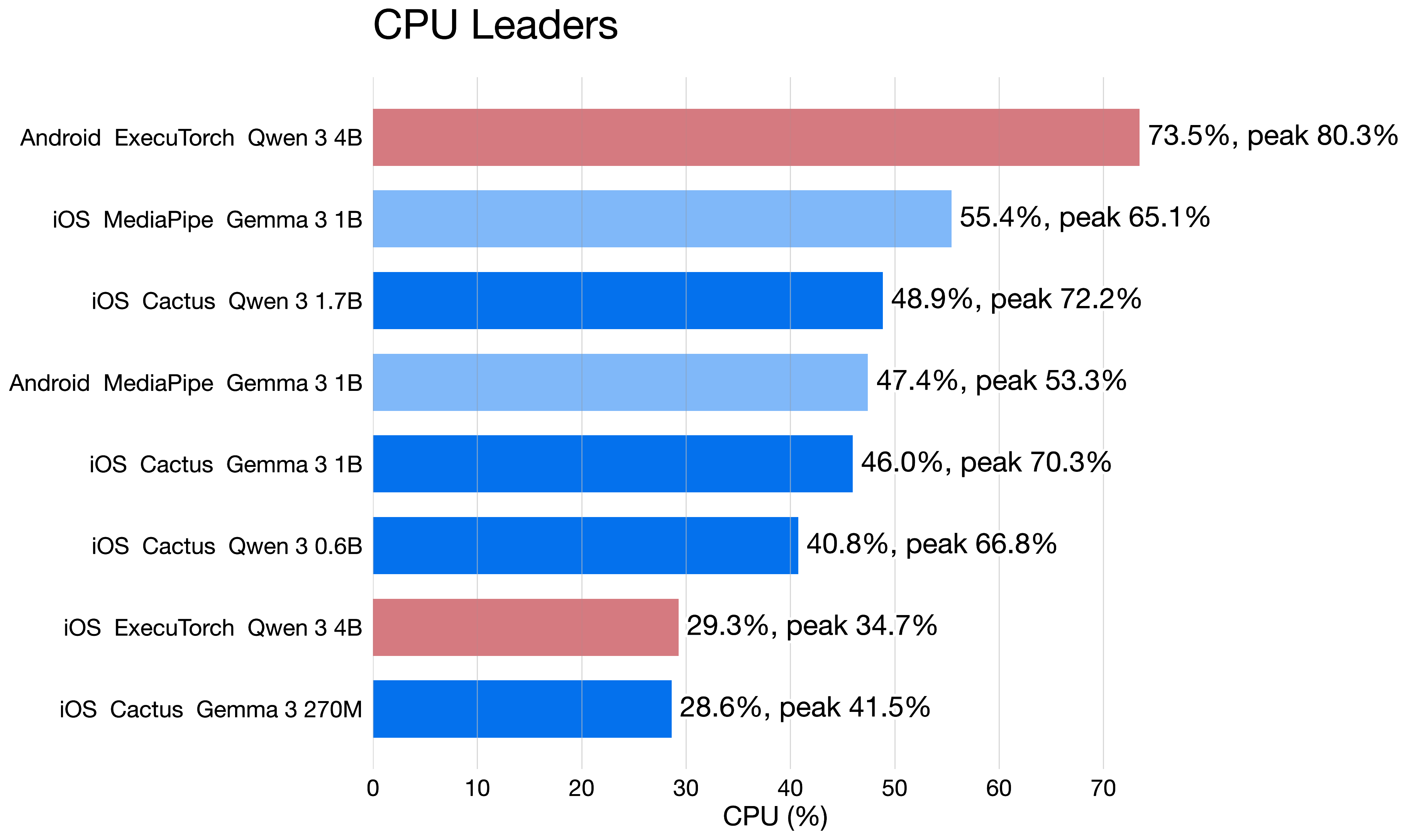
Chart: The runs with the highest average CPU load across the mobile benchmark.
CPU load helps explain why some runs feel heavier than token speed alone would suggest.
The most CPU-intensive run in the whole dataset was Android ExecuTorch with Qwen 3 4B at 73.47% average CPU, peaking at 80.28%. On iOS, the highest average CPU load came from MediaPipe with Gemma 3 1B at 55.44%, followed by Cactus with Qwen 3 1.7B at 48.86%.
It turns into thermals, background responsiveness, and how comfortable repeated inference feels in a real app session.
The CPU is not fully occupied when the acceleration is working, because the GPU is doing the heavy lifting. That is why, you see even larger models lower in the CPU ranking.
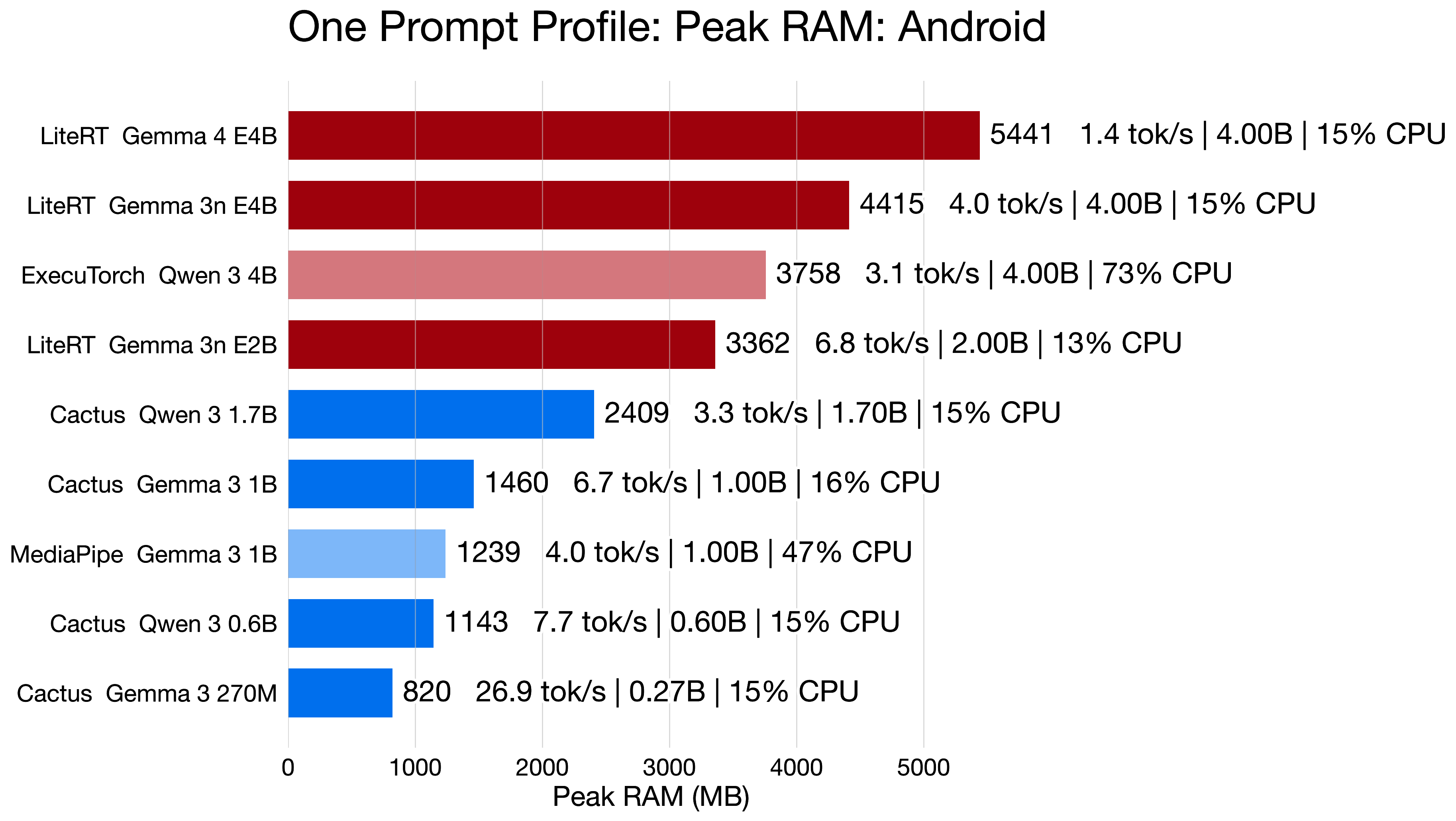
Chart: Peak RAM usage across the measured Android runs.
On Android, memory pressure climbed fastest on the GPU-heavy and larger-model paths.
Maybe, it is not the best idea to push a 6GB RAM phone to the limits with a single model. The phone can run out of memory, or it can start killing background apps, which is not a great user experience.
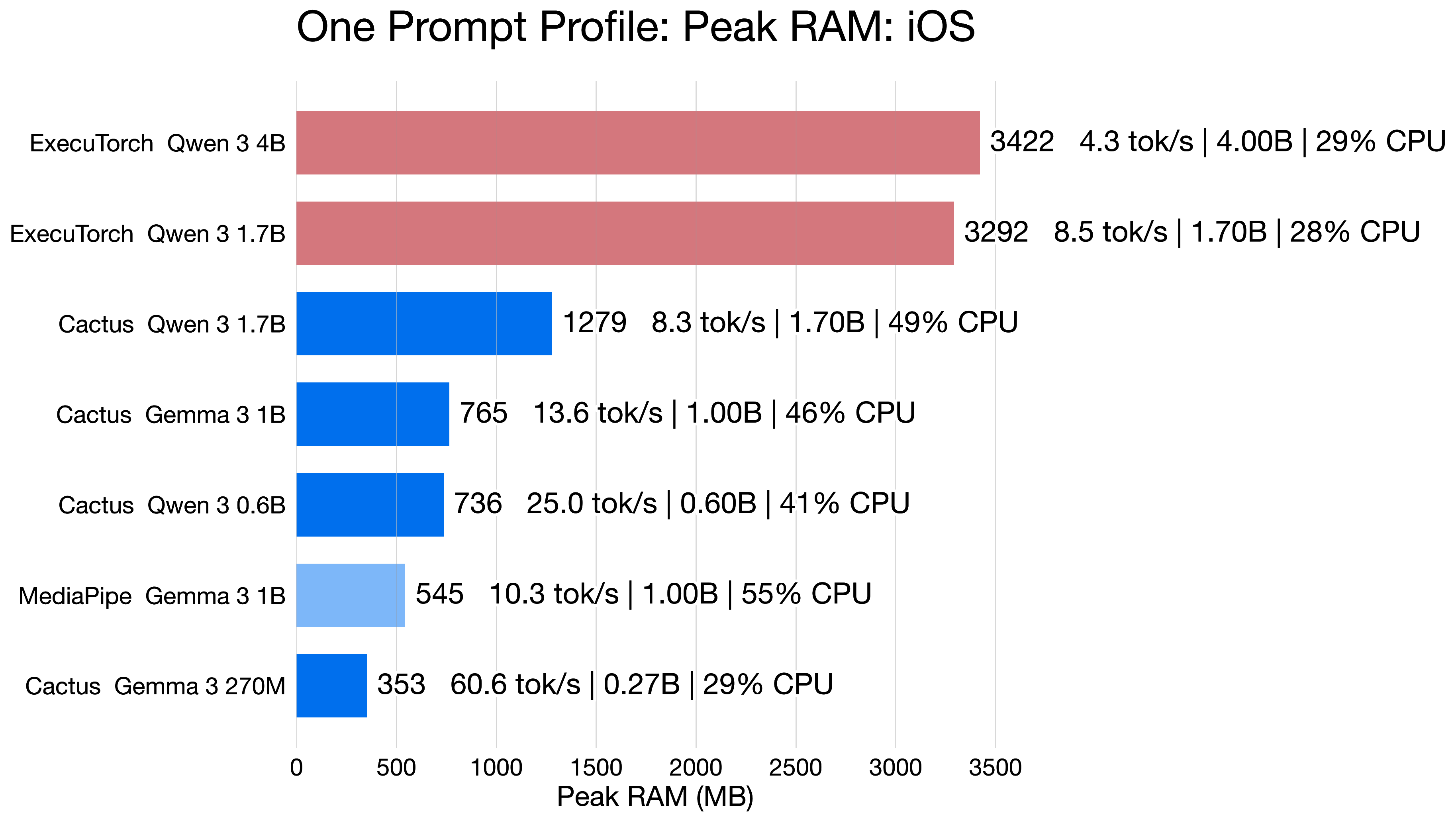
Chart: Peak RAM usage across the measured iOS runs.
The iOS memory story was still important, but generally less punishing in the matched comparisons. Interesting part is that Cactus is able to use the same model with half the RAM in comparison to ExecuTorch, while doing the same thing.
The main difference between Android and iOS here is that iOS has better memory management and can run the same models with less RAM, while Android’s GPU-heavy paths tend to push memory usage into a range that is not acceptable for many mid-range phones.
How I Would Build This In A Real App
If I wanted to ship a medical-results assistant on mobile, I would not build it as one giant prompt over a raw PDF.
I would split the problem into deterministic and probabilistic parts.
Extraction And Validation Flow
- Parse the document first. Use OCR or PDF extraction to get analytes, values, units, and reference ranges into a structured form.
- Normalize before the model sees it. Resolve unit aliases, analyte synonyms, and obviously malformed fields before passing anything to the model.
- Use the LLM only for constrained interpretation. Ask it to explain what an already extracted result likely means, not to invent missing data.
- Validate every structured output. Reject answers with missing units, impossible ranges, or unsupported analytes.
- Keep critical guardrails rule-based. Hard-coded medical safety checks should outrank the model. The app can have database of critical values and if the model produces something that looks like a critical value, the app should flag it regardless of what the model says about it.
- Show uncertainty in the UI. If the model is unsure, the app should say so directly and point the user toward professional follow-up.
Cross-Platform Runtime Layer
For the runtime layer, a Flutter shell with native adapters is a good fit. That was also the setup I used for the benchmark.
The UI and data flow can stay shared, while Android and iOS each use the runtime that makes the most sense for that platform.
If you look for first implementation, that is easy and practical. Cactus is a good starting point for both platforms, and then you can add acceleration-heavy paths for the stronger models once you have the basic flow working.
After Google IO 2026, Flutter environment will get official plugin support for LiteRT, which will make it easier to use the same runtime on all platforms. That is a great step forward for cross-platform local LLMs.
What This Is Actually Useful For
I do think local LLMs on mobile have a real place in healthcare.
Just not in the form many people imagine. Yes, we could give the power to people to interpret their own blood test results, but I think we can go further than that.
A more interesting direction is to use local LLMs as assistants for clinicians, not as free-form chatbots for patients. They can help dig through multiple documents, extract relevant information, and provide a preliminary interpretation that the clinician can then review and adjust.
What I Would Not Trust It With
I would not trust a small mobile LLM to diagnose disease, replace a doctor, or produce a final recommendation without deterministic checks around it.
The models are already good enough to sound convincing.
That is exactly why testing matters so much.
Final Takeaway
The interesting part of local mobile LLMs is not that they can run on phones.
That part is becoming normal. Phones will get their local models and recent flagshop devices with Android already have Gemini nano inside them. That is not the part that makes them interesting.
The interesting part is that they can become useful on phones if you treat them like a constrained system instead of a magical brain.
They can gather information from other apps, tidy your calendar, improve quality of images and more.
Main Lessons From This Project
For this project, the main lessons were straightforward:
- Structured output beats prompt-only approaches.
- Gemma 4 and Qwen 3.5 were the most practical candidates. (April 2026)
- Runtime choice matters almost as much as model choice on mobile, especially for speed, RAM, and battery.
- The most dangerous failures are wrong values, not empty answers.
- The safest product is a private, offline assistant with strong validation, not a free-form diagnosis tool.
That is also why I find local LLMs interesting in medicine.
They are not useful because they are small.
They become useful only after a lot of testing, iteration, and constraints around them.
Example Apps And Reference
If you want to see how some of these ideas look in real mobile products, these apps are useful reference points:
- Google AI Edge Gallery on the App Store
- Google AI Edge Gallery on Google Play
- Cactus Chat on the App Store
- Cactus Chat on Google Play
For Cactus specifically, it is also worth keeping in mind that it is a hobbyist project. The project reference is:
Ndubuaku, Henry and Cactus Team. Cactus: AI Inference Engine for Phones & Wearables. 2025. https://github.com/cactus-compute/cactus
Socials
Thanks for reading this article!
For more content like this, follow me here or on X or LinkedIn.